Protect documents and intellectual property after you share them.
Control who can open a document, how long access lasts, and when access ends. Use the MyPass DRM workspace directly or integrate document protection into your product through the API.
Start free. No credit card required.
Try it: watermark a document to a reader
Set the reader and the policy — the preview updates the watermark and controls in real time.
Interactive illustration with sample content — not the production viewer. Watermark fields and placement are configured per deployment; the screenshots elsewhere on this page show the actual product interface.
Protect content, control access, and connect your systems.
Add documents to MyPass DRM. Apply access rules, deliver protected content through the workspace or API, and review activity from the same platform.
The MyPass DRM workflow has four stages: add a PDF document; the protection engine applies reader identity, watermark, expiration, device limit, open limit and revocation rules; the protected document is delivered through the protected viewer, the REST API, or sent for signature; access activity returns to the platform for review and revocation.
Add content
Apply protection
- Reader identity
- Watermark
- Expiration
- Device limit
- Open limit
- Revocation
Deliver or integrate
Review and respond
- Reader opened content
- Device authorized
- Signature completed
- Access expired
- Access revoked
Review activity and update access
Supported content
PDF · Additional formats confirmed during setup
Delivery options
Workspace · Protected viewer · REST API · Send for signature
Access controls
Watermarks · Expiration · Device limits · Open limits · Revocation
Use the workspace or integrate the API.
Manage protected documents directly in MyPass DRM, or add the same controls to your existing product.
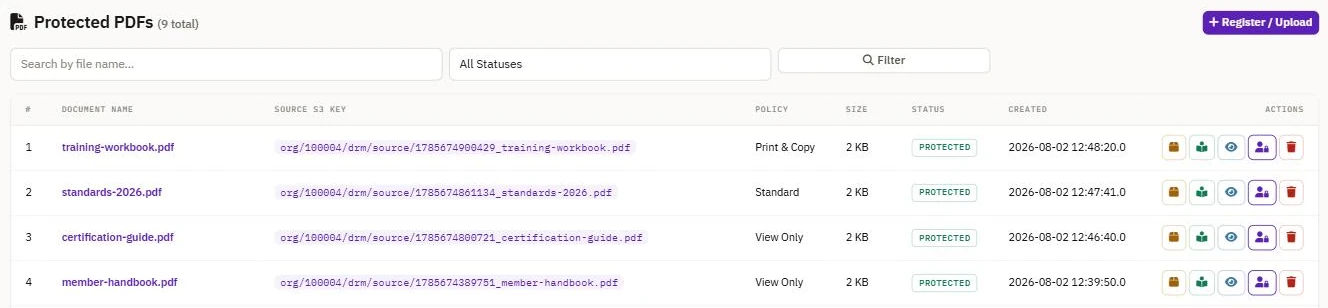
Work in MyPass DRM
Upload documents, assign readers, configure access rules, share protected access, and review activity from one workspace.
Build with the API
Add document protection to an LMS, membership platform, portal, marketplace, or application.
/api/v1/docs/protectProtect a PDF and return distribution links/api/v1/activations/{id}/revokeRevoke an activation/api/v1/auditSearch access eventsFrom the MyPass DRM OpenAPI specification.
Explore the API (opens in a new tab)What the reader experiences
Readers open protected content through a controlled viewer. Access is evaluated against the assigned policy whenever the document is opened.
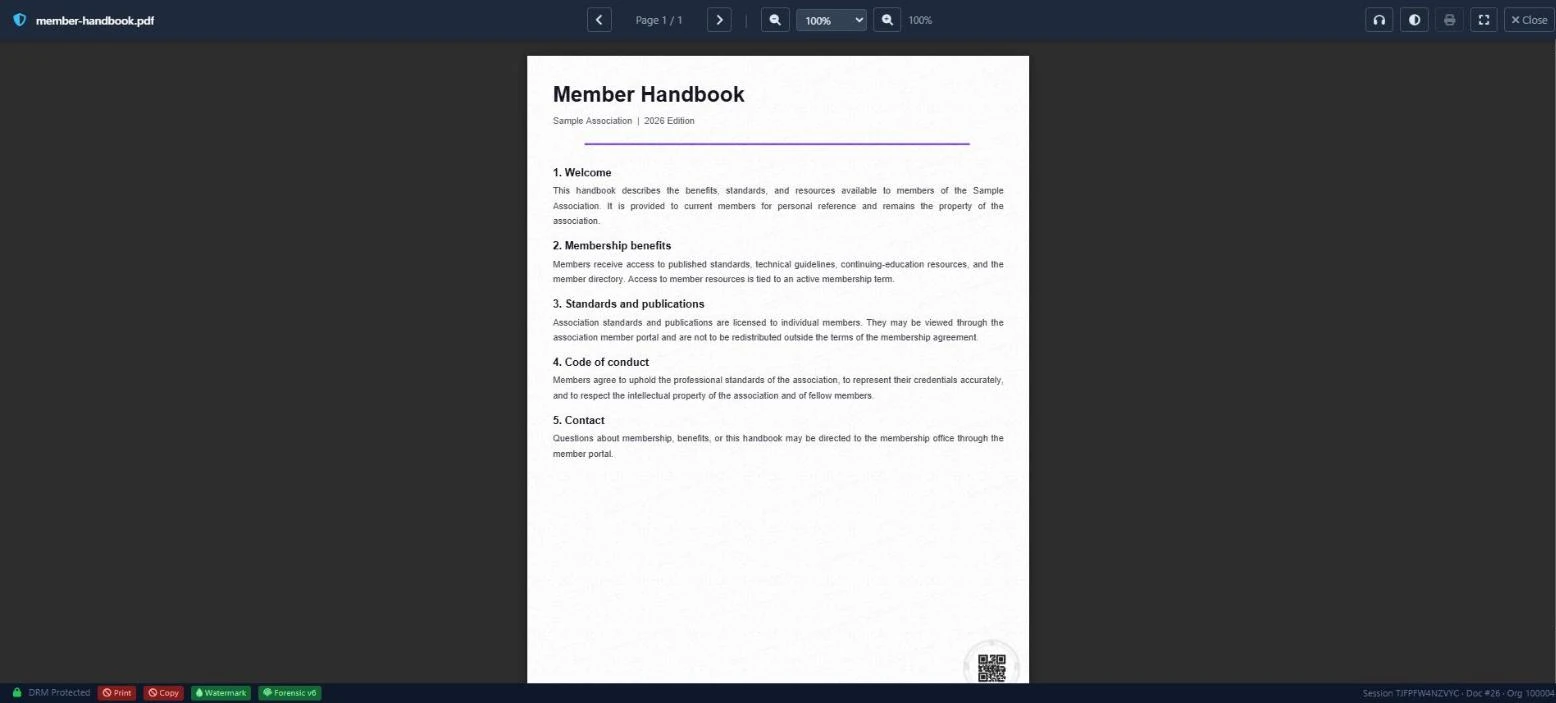
Reader identification
The protected view can display the authorized reader's identity.
Policy evaluation
Expiration, open limits, and device authorization are checked when access is requested.
Access can end
Administrators can update or revoke access without distributing another file.
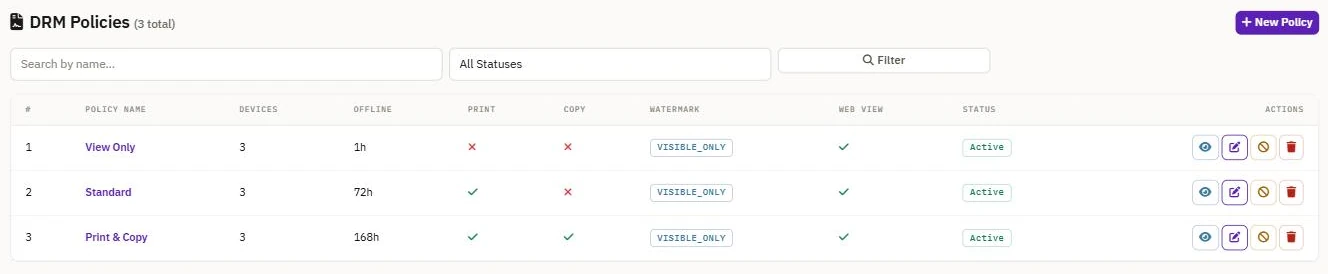
Set the rules for each document
Assign a policy to each document — device limits, offline access duration, printing and copying, and reader watermarking. The policy is evaluated whenever the document is opened, so a change applies without sending a new file.
See access activity and respond
Review document access and revoke a reader or device when access should no longer continue.
| Reader | Document | Time | Device | Result | Action |
|---|---|---|---|---|---|
| A. Morgan | member-handbook.pdf | Today, 10:24 | Laptop — authorized | Opened | Revoke |
| J. Chen | certification-guide.pdf | Today, 09:51 | Tablet — authorized | Opened | Revoke |
| A. Morgan | member-handbook.pdf | Yesterday, 16:08 | Phone — new device | Device authorized | Revoke |
| R. Patel | annual-report.pdf | Yesterday, 11:32 | Laptop — authorized | Denied — expired | — |
Example shown with sample data.
Review activity
See when access was requested and which authorized device was used.
Revoke access
End access for a reader or device without distributing another version.
What you can control
Set access rules once and evaluate them whenever the document is opened.
Reader identification
Display the authorized reader's identity on the protected view.
Expiration
End access on a specified date or after a defined number of opens.
Device limits
Control how many devices a reader can authorize.
Access records
Review when access was requested and which authorized device was used.
Revocation
End access without distributing another copy.
Also available: send documents for signature. Signed documents keep the same controls.
For organizations that distribute valuable content
Associations & standards organizations
Control access to standards, guidelines, publications, and member resources.
Access tied to membership or licensing periods.
Training & certification providers
Protect courseware, exam-preparation content, certification materials, and licensed training resources.
Access tied to enrollment or course dates.
Publishers & research firms
Distribute reports, research, and technical publications to authorized readers.
Access tied to a purchased license or subscription.
- TLS 1.3 in transit Traffic to the site and API is encrypted in transit.
- AES-256-GCM at rest Protected documents are stored encrypted.
- Policy checked at every open Access rules are evaluated each time a document is opened.
- GDPR-aligned data handling Data-processing agreements available on request.
What document DRM can—and cannot—do
MyPass DRM helps reduce casual forwarding, limit access after delivery, and make unauthorized sharing easier to investigate.
No DRM can prevent every screen photograph or determined capture attempt. The purpose is to replace uncontrolled files with identifiable, manageable access.
In practice
- Each protected view can carry the authorized reader's identity.
- Access ends on expiry, at the open limit, or when revoked.
- Access records show who opened a document, when, and on which device.
Start free and expand when you need more capacity.
Create an account and begin with the free plan. Review available capacity and upgrade options on the pricing page.
Protect a document or inspect the API.
Create an account to use the MyPass DRM workspace, or review the API before integrating it into your application.
Start free. No credit card required.