Locklizard alternatives: comparing document DRM platforms
Locklizard is one of the longest-established names in document DRM, and for many buyers it is the first platform they evaluate. It is also the platform people most often search for alternatives to — usually not because protection failed, but because of how the protection is delivered: the recipient experience, the administration model, or the fit with the systems that already run their business.
This guide explains what actually differs between document DRM platforms, where an alternative makes sense, and how MyPass DRM compares. We name where MyPass DRM is a good fit and where it is not — and we recommend verifying every claim in this guide, including ours, with a proof of concept on your own content.
Why buyers look for a Locklizard alternative
The recurring themes in evaluations we see are consistent across vendors of the installed-viewer generation of DRM, not unique to any one product:
- Recipient friction. Platforms built around installed secure-viewer applications ask every reader to download and install software before they can open the first document. For internal teams that can be acceptable; for members, customers, or one-time recipients, every install step loses readers and creates support tickets.
- Administration weight. Managing viewer versions, license files, and per-machine activation is real operational work that lands on your team.
- Integration model. If protection needs to happen inside your LMS, member portal, or storefront, the question is less "which features exist" and more "can I drive this entirely through an API" — protect on upload, entitle on purchase, revoke on refund.
- Pricing shape. Document DRM is priced many ways across the market — by users, by publications, by storage, by usage. The right shape depends on whether your reader count or your document count grows faster.
None of these are criticisms of any vendor's security. They are questions of fit.
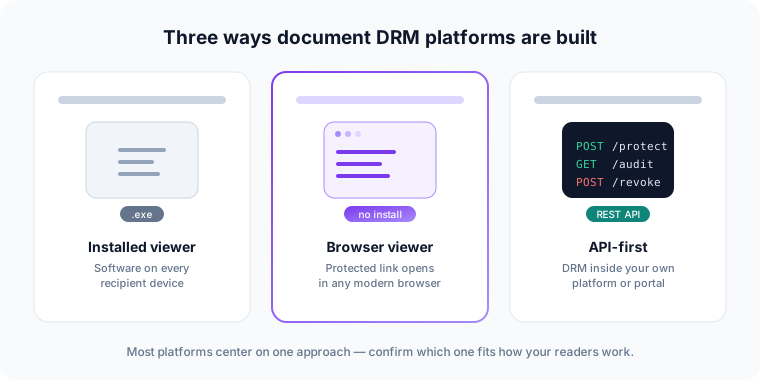
The three architectures, honestly compared
1. Installed secure viewers
A dedicated application on the recipient's device decrypts and displays content. This approach can enforce controls the browser cannot, and some regulated environments prefer it. The trade is recipient friction and device administration. If your readers are employees on managed machines, this trade can be fine. If they are members or paying customers, expect drop-off.
2. Browser-based protected viewing
The recipient opens a protected link in a normal browser; the policy — watermark, expiration, device authorization, print and copy rules — is evaluated at the moment of open. No install, no version management. The honest trade: a browser cannot stop someone photographing a screen, which is why identifying watermarks and access records matter more in this model than any single blocking control. (No architecture stops screen photography; installed viewers can't either.)
3. API-first protection
DRM as a service your own platform calls: protect a document at upload, grant access at purchase or enrollment, revoke on refund or expiry, and read access events back into your product. This is the right model when the protected content lives inside something you have already built.
What to confirm with any vendor — including us
Whichever direction you lean, put the same questions to every platform on your shortlist. Our DRM evaluation checklist covers the full list; the ones that most often decide a Locklizard-versus-alternative evaluation are:
- What must a first-time recipient do before the document opens — and how long does it take?
- Can protection, entitlement, and revocation be driven entirely by API? Is the API documentation public?
- Can a policy change (shorter expiry, revoked reader) apply to documents already delivered, without re-sending files?
- What exactly is recorded when a document is opened, and can you export it?
- What does the price track — readers, documents, storage — and which of those grows for you?
Where MyPass DRM fits
MyPass DRM is built on the second and third models: recipients open protected documents in a controlled browser viewer with no installation, and everything the workspace does — protect, assign readers, set policy, revoke, audit — is also available through a public REST API. Policies are evaluated at every open, so a change applies without redistributing a file. It is available standalone and is the native DRM layer for MyPass LMS, which matters if training or certification content is part of what you protect.
Where we are honest about fit: if your requirement is an installed, offline-first viewer on locked-down desktops, an installed-viewer platform may match your environment better than we do. Review our security overview — including what DRM cannot do — and pricing, which tracks monthly active documents rather than reader counts.
A note on fairness: competitor capabilities change. We deliberately avoid feature-by-feature grids that go stale; confirm current capabilities on each vendor's site and in a live evaluation with your own documents.
What each platform publishes for pricing
Pricing is the one difference you can check yourself in five minutes, and it is where the installed-viewer generation of DRM and the self-serve generation diverge most sharply. Locklizard does not publish a price: its ordering page asks you to contact sales to discuss requirements and configuration, and the secure viewers themselves are free of charge. That is a normal model for publisher-licence software, but it means a shortlist that includes Locklizard cannot be costed without a sales conversation.
Among platforms that do publish, the range as of 3 September 2026 runs from $39 a month (MyPass DRM, up to 500 monthly active documents) through $100 a month (DRM-X Basic) and $140 a month (Digify Pro, one user) to $5,000 a year (Vitrium Pro). The unit matters more than the number: seats, active documents, licence quota and annual contract all grow differently as your programme grows.
We keep the full comparison on one dated page rather than repeating figures across the site — see what document DRM actually costs, with every figure read from the vendor's own pricing page and the date it was checked.