What is DRM — and how MyPass DRM works
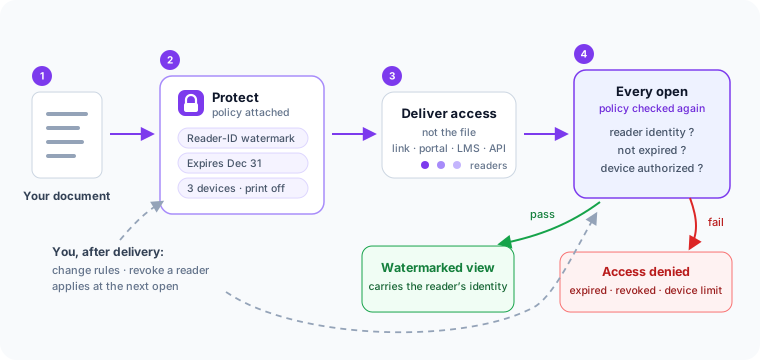
Digital rights management (DRM) keeps you in control of content after you've shared it. Instead of sending a copy that is instantly out of your hands, you deliver controlled access whose rules are checked by the service every time the document is opened — not just while it sits on your server.
The problem DRM addresses
Most everyday tools protect content only up to the point of delivery. An emailed document, a download link, or a password-protected PDF works until the file is forwarded, the link is reshared, or the password is passed along. After that, you can't see who has the content, can't change the rules, and can't take access back.
How policy-based protection works
A DRM system lets you:
- Deliver content through a controlled viewer instead of a raw file.
- Decide who can open it, and for how long.
- Stamp each view with the reader, so a leak traces back to a person.
- Record every open — who, when, and on which device.
Because the rules are enforced at each open rather than baked into a file, you can change or revoke access after delivery, and access ends on its own when it should.
What happens at every open
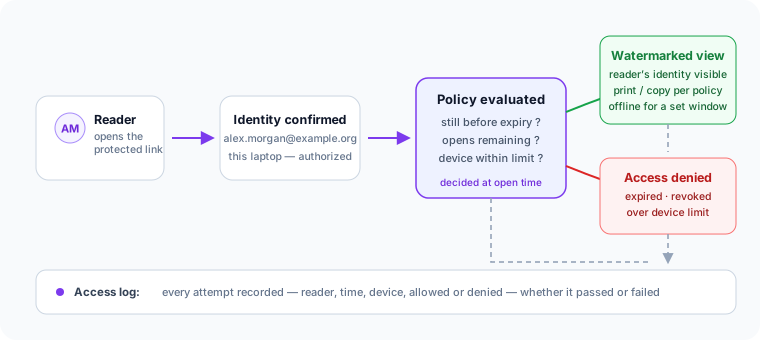
The moment that makes DRM different from a locked file is the open event. When a reader opens protected content, the viewer confirms who they are, checks the document’s policy — has it expired, are opens remaining, is this device within the limit — and only then renders the watermarked view. A reader whose access has ended sees a denial instead, and either way the attempt lands in the access record. This is why revocation works on documents delivered weeks ago: the decision is made at open time, not at send time.
What DRM can and cannot do
DRM makes content harder to leak and easier to trace back to a person. It is not absolute: no DRM system stops every photograph of a screen, every screen recording, every case of credential sharing, or a determined extraction attempt. Any vendor that claims otherwise is overstating what the technology does.
The goal isn't a perfect lock. It's to make casual forwarding, oversharing, and access-after-expiry no longer easy or anonymous. For a fuller tour of the category — the controls that matter, workspace versus API, and how pricing models differ — see our guide to document DRM software — and if you've just received a protected document, the recipient-side explainer answers the questions readers actually ask.
Where MyPass DRM fits
MyPass DRM is a Kprise product for organizations that distribute training, certification, association and research content. It applies policy-based controls — controlled delivery, recipient watermarking, time-based access, device authorization and access records — through a controlled viewer. Use it standalone, or connect it with MyPass LMS and other platforms; if your content lives in a learning platform, DRM for LMS course content covers that case in depth. Plans start free on usage-based pricing, and the knowledge base documents setup, formats and policies.