Document DRM software: what it is, how it works, and how to choose
The moment a document is downloaded, ordinary security ends. Encryption protected it in transit; your portal checked a login; and none of that says anything about what happens next — the file is now a perfect, anonymous copy on someone else's machine. Document DRM software exists for exactly this gap. It replaces the file you can't see with controlled access you still govern: who can open the document, on how many devices, until when, and with what permissions — checked every time it is opened, for as long as it circulates.
This guide is for organizations whose documents are the product or carry real risk when they wander: training and certification providers, associations distributing standards and member publications, publishers and research firms, and teams sharing confidential internal material. It covers what document DRM actually does, the controls that separate serious platforms from PDF-password tools, the two ways to run one, and what it should cost.
What document DRM software does
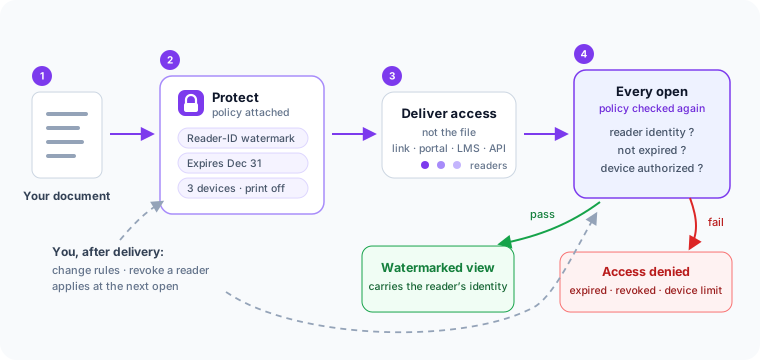
A document DRM platform changes what you distribute. Instead of sending a file, you protect the document once, attach a policy, and deliver access to named readers. The protection stays with the document after delivery — saved locally, moved to another machine, it doesn't matter — because opening it triggers a policy check against the service. That is the property that matters: the rules are evaluated at every open, not baked in at send time.
Three consequences follow. A policy change applies to documents you delivered weeks ago, without re-sending anything. Access can end — on a date, at an open limit, or the moment you revoke it. And every open becomes a record: who, when, which device, allowed or denied. If you want the full mechanics, how MyPass DRM works walks through the protect → policy → deliver → open cycle step by step.
Why passwords and permission flags aren't protection
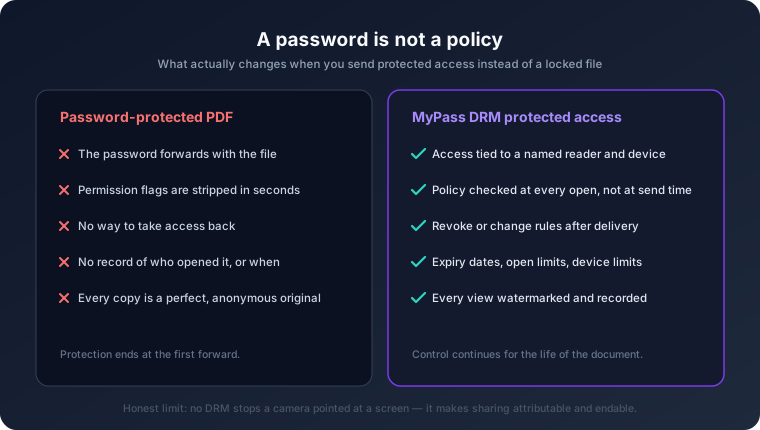
Most teams arrive at DRM after the cheaper options fail. A PDF password forwards as easily as the PDF. Built-in PDF "permissions" — the checkboxes that disable printing and copying — are honored voluntarily by some readers and stripped in seconds by free tools. Static watermarks deter, but can't expire or be revoked. Drive links protect the container, not the content: once viewing is allowed, so is downloading, and the download is again an uncontrolled file. We've written a plain-language breakdown of what each of these methods really does — the short version is that none of them survives contact with the person you actually sent the document to.
The controls that matter
Evaluate any document DRM software — ours included — on whether it gives you these controls, enforced at the document rather than promised at the perimeter:
- Dynamic watermarking. The protected view visibly carries the authorized reader's identity, applied at view time rather than baked into the file. Every copy names its reader; a leaked page names its source.
- Expiration and open limits. Access ends on a date, after a defined number of opens, or when an enrollment or license period does — automatically, with no chasing.
- Device authorization. Each reader can use a limited number of authorized devices, so one set of credentials stops scaling into a department-wide subscription.
- Print and copy controls. Allowed or blocked per policy, not per PDF checkbox — and changeable after delivery.
- Time-boxed offline access. Legitimate readers work on planes and trains; a good policy grants offline viewing for a defined window instead of choosing between "always" and "never".
- Revocation. End a reader's or a device's access immediately, including for documents already delivered.
- Access records. A reviewable history of opens, device authorizations and denials — the difference between suspecting a leak and tracing one.
The features page covers each control in product terms, and our neutral DRM evaluation checklist turns this list into questions to put to any vendor.
Two ways to run it: workspace or API
How you operate document DRM matters as much as what it enforces, and the honest answer depends on your volume.
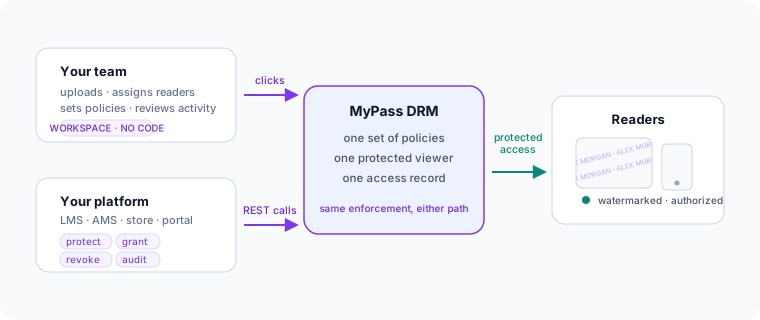
The workspace is the no-code path: upload documents, assign policies and readers, share protected access, review activity — all from a browser. It suits teams protecting dozens to hundreds of documents, or high-value manual distributions like board packs and standards releases, where a person deciding each grant is a feature rather than a bottleneck.
The REST API is the automation path for platforms and higher volumes. The integration model is four verbs: protect a document, grant access when your system says so (an enrollment, a purchase, a membership), revoke it when that status ends, and audit access events back into your own records. Wired into an LMS, AMS, store or portal, protection stops being a manual step anyone can forget — every document leaves with its policy attached. If that's your route, start with adding DRM to an LMS via the API or the broader platform integration guide.
These aren't rival editions — the same policies and viewer sit under both, so many teams start manual and automate the moment volume justifies it.
Where it pays for itself
Training and certification providers lose revenue to shared courseware and to "zombie access" — learners keeping materials long after enrollment ends. Enrollment-linked expiry and reader-identified copies close both paths; DRM for training content maps each leak to its control. Associations need member benefits to end when membership does, and standards to stop leaking institution-wide from one login — the subject of DRM for associations. Publishers and research firms protect premium pricing by keeping a single license from quietly serving a whole department, which is what device limits are for. And any organization sending confidential documents outward — diligence packs, technical documentation, pre-release material — gets the same two things: sharing that stops being effortless, and leaks that stop being anonymous; the enterprise workflow guide covers making that stick at company scale.
What document DRM cannot do
A guide that skipped this section would be selling, not informing. No DRM software prevents every screen photograph or a determined capture, and no honest vendor claims otherwise. What the controls above change is the economics of leaking: anonymous, permanent, uncontrolled copies become identified, expiring, revocable access. Casual sharing — the overwhelming majority of real-world leakage — stops being effortless, and serious leaks become attributable and endable. Our security overview states these limits plainly, alongside what is actually enforced and how.
What it should cost
Pricing models are a real differentiator between platforms — some charge per user, some per document stored, some per "publication". MyPass DRM prices on Monthly Active Documents: documents actually opened in a month, not your archive. Protection starts free for up to 100 active documents with the API included, moves to Pro at $39/month (or $299/year) for up to 500, and goes custom above that. The pricing page has the full comparison and a calculator for estimating your volume. Whatever platform you choose, insist on a unit of pricing you can predict from your own numbers.
Common questions
A password travels with the file: whoever forwards the PDF forwards the password with it, and once the document is open the reader can save, print and re-send an unlocked copy. Document DRM replaces the file with controlled access tied to a named reader. The policy — expiration, device limits, watermarking, print and copy permissions — is evaluated every time the document is opened, and it can be changed or revoked after delivery.
Yes. A dynamic watermark carries the authorized reader's identity on the protected view at every open, so each person sees a copy visibly tied to them. That is the strongest practical deterrent to casual forwarding, because a leaked page names its source.
Yes. Because the policy is checked when the document is opened, revoking a reader or a device ends access even for protected documents already delivered. You do not re-send anything — the same document simply stops opening for that reader.
Printing and copying are policy decisions — each document policy allows or blocks them. Screenshots are different: no DRM product can stop every screen capture or a phone photographed at a screen, and vendors who promise that should worry you. The realistic protection is that every view carries the reader's identity, so captures are attributable rather than anonymous.
Your platform stays the system of record and calls the API at the moments that matter: protect a document once, grant access when someone enrolls or purchases, revoke it when their access should end, and read back access events for your own records. Readers open protected content through the controlled viewer without leaving your delivery flow.
Plans are based on Monthly Active Documents — documents that are actually opened in a month, not documents stored. The Free plan covers up to 100 active documents, Pro covers up to 500 at $39 per month or $299 per year, and Enterprise plans above that are custom. The REST API is available on every plan, including Free.