Adding document DRM to your platform through an API
If you run an LMS, membership platform, marketplace, or client portal, sooner or later a customer asks the question that starts this whole category: "can you stop people re-sharing the documents they download from us?" You then face a build-versus-integrate decision on a problem that looks small and is not.
Why building DRM in-house goes wrong
The first 20% — encrypt the file, gate the download behind auth — is a sprint. The remaining 80% is the product: a protected viewer that renders documents faithfully across browsers and devices, per-reader watermark composition, policy evaluation on every open, device authorization and revocation, offline rules, and an audit trail your customers will ask to export. Each of those is ongoing maintenance, none of it differentiates your platform, and all of it competes with your actual roadmap. The build-versus-integrate math here looks like payments or email delivery: possible to build, rarely worth owning.
What the integration model looks like
An API-first DRM layer keeps your platform in charge of users, checkout, and experience, and delegates protection:
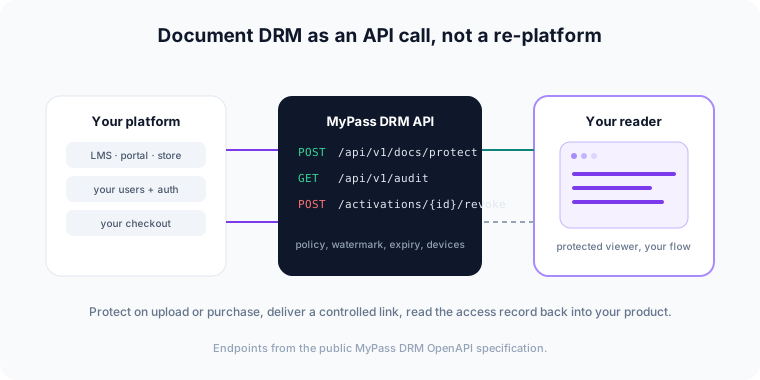
- Protect at upload or publish.
POST /api/v1/docs/protecttakes a PDF and returns distribution links under the policy you specify — watermark, expiration, device and open limits. - Grant on purchase or enrollment. Your checkout or enrollment flow assigns the reader; they open a protected link in the browser with nothing to install.
- Revoke on refund, expiry, or violation.
POST /api/v1/activations/{id}/revokeends access for content already delivered — no file recall required, because there is no file out there to recall. - Read activity back.
GET /api/v1/auditreturns access events — opens, device authorizations, denials — that you can surface inside your own product.
Those endpoints are from the public MyPass DRM OpenAPI specification — you can read the full API surface before you ever create an account, which is exactly how we'd want to evaluate a vendor ourselves.
What to evaluate in any DRM API
- Public documentation. If you can't read the API reference before talking to sales, integration risk is being hidden from you.
- Policy-at-open semantics. Confirm a policy change (shorter expiry, revoked reader) affects documents already delivered. If protection is baked at encrypt time, revocation is a fiction.
- Reader experience. Walk through the first open as your least technical customer. Installs and account-creation walls will surface as your support tickets, not the vendor's.
- Auditability. Access events should be queryable by API so you can show them in your product, not trapped in the vendor's dashboard.
- Tenancy and branding. How is your customers' content isolated, and whose brand does the reader see? The security overview covers how MyPass DRM handles organization isolation.
Standalone or native to MyPass LMS
MyPass DRM runs standalone behind any platform via the API, and it is the native DRM layer inside MyPass LMS — the same policy engine either way. If you're building learning or certification delivery, that pairing removes an integration entirely; if you're building anything else, the Developers page is the place to start, and pricing tracks monthly active documents, which for most platforms maps to actual usage better than reader-count licensing.