A REST API for document security: automating protection end to end
Manual document security fails in a predictable way: not because the controls are weak, but because a person has to remember to apply them. Someone forgets to protect the file before sending it, forgets to end access when a contract does, forgets to check who still has what. A REST API for document security exists to remove the remembering. Protection, access and revocation become steps your systems execute — on every document, every time, triggered by the events your business already tracks.
This guide is for engineering and operations teams automating document protection with the MyPass DRM API: the four calls that matter, the workflows worth wiring up first, and where the automation boundary honestly sits. If you're still deciding whether to integrate an API at all, start with the build-versus-integrate guide; if your platform is an LMS, the LMS integration guide covers that path in depth.
Four calls, whole lifecycle
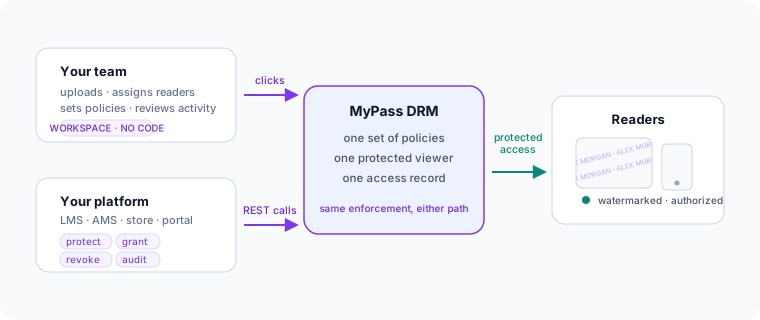
The MyPass DRM API reduces document security to four operations, and every workflow below is a composition of them:
- Protect.
POST /api/v1/docs/protecttakes a document and returns protected distribution links. The policy — reader watermarking, expiry, open limits, device limits, print and copy permissions — is attached here, once. - Grant. Access is issued to a named reader when your system says so: a purchase completes, an enrollment starts, a deal room opens.
- Revoke.
POST /api/v1/activations/{id}/revokeends access — for a reader or a device — effective at the next open, with no file to claw back. The revocation deep-dive covers the mechanics and granularity. - Audit.
GET /api/v1/auditreturns access events — who opened what, when, on which device, allowed or denied — for your own records and reviews.
Because the policy is evaluated at every open rather than baked into the file, an API call made today changes the behavior of a document you delivered last month. That is the property that makes automation meaningful: your systems stay in control of documents that have already left.
The workflows worth automating first
Grant on entitlement, revoke on its end
The highest-value automation is symmetry: wherever your system grants access, wire the opposite event to revoke it. Enrollment ends → courseware access ends. Membership lapses → standards access ends. An employee offboards → every internal document they could open is revoked in one pass. Most real-world leakage is not theft — it's access that simply never ended. Symmetric automation closes that class of problem entirely.
Protect at the point of creation
Teams that protect documents "before sending" eventually send one unprotected. Move the protect call to where documents enter your system — the report generator, the export pipeline, the upload handler — so an unprotected copy never exists in circulation. One policy decision, enforced by code, replaces a per-document human habit.
Expiry by rule, not by memory
Time-boxed access — a 30-day trial document, exam materials that end with the exam window, a diligence pack that closes with the deal — belongs in the policy, not in someone's calendar. Set the expiry when you protect or grant, and access ends on schedule whether or not anyone remembers.
Audit into your own records
Pull access events on a schedule into the system where your team already looks — a warehouse, a SIEM, a spreadsheet review. The point is not surveillance; it's that "who still has access to what, and who used it" becomes a query instead of an investigation.
What automation cannot do
An API automates the controls; it doesn't change what the controls are. No call in any DRM API prevents a person from photographing a screen, and a vendor whose API documentation implies otherwise deserves your skepticism. What automation changes is coverage and consistency: every document protected, every access tied to a person and device, every ending enforced — with the failure mode of "someone forgot" removed. The security overview states the full model and its limits plainly.
Getting started
The API is available on every plan, including the free tier, so the integration can be built and tested before any purchase decision. The developer overview covers authentication and the integration model, and the full reference lives in the OpenAPI documentation (opens in a new tab). For the most common automation — applying reader watermarks programmatically — see the companion guide to automating PDF watermarking with the API.