How to stop a PDF from being shared after you send it
The honest answer first: once a normal PDF file leaves your outbox, you cannot stop it from being shared. Every copy is a perfect original, and email has no recall. What you can do is stop sending the file itself — and send controlled access to it instead. This guide walks through the options people actually try, what each one really does, and where document DRM fits.
The methods people try first — and what they actually do
Password-protecting the PDF
A password travels with the file. Whoever forwards the PDF forwards the password in the next line of the email. Passwords also do nothing after opening: the recipient can save, print, and re-send an unlocked copy. Password protection is a speed bump for strangers, not a control on the person you sent it to — and the person you sent it to is where most sharing starts.
PDF "permissions" (disable printing and copying)
Standard PDF permission flags are a request, not an enforcement. Many PDF readers simply ignore them, and free tools strip them in seconds. Treat these flags as a statement of intent, not protection.
Static watermarks
Stamping "Confidential — Jane Smith" on each copy is genuinely useful: it deters casual forwarding because the copy names its recipient. But a static watermark is baked in at send time. It cannot expire, cannot be revoked, and tells you nothing about what happened after delivery.
Link-based sharing (cloud drives)
Sharing a link instead of a file is a real improvement — you can revoke the link. But most drive links protect the container, not the content: once viewing is allowed, downloading or re-sharing usually is too, and "anyone with the link" settings quietly defeat the point.
What changes with document DRM
Document DRM keeps the document under policy after delivery. Instead of a file, the recipient gets access — and the policy is evaluated every time they open it.
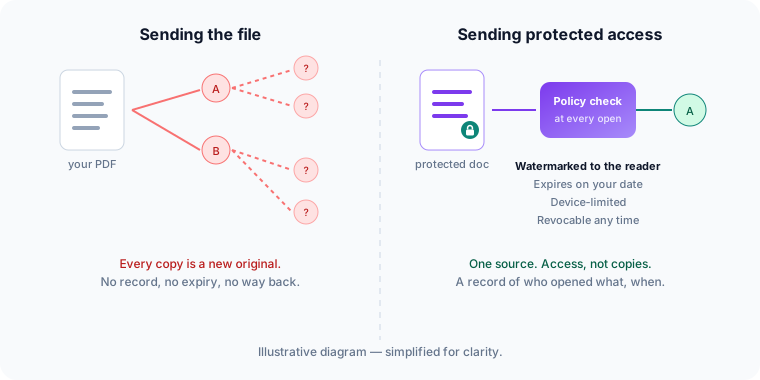
In practice that means:
- The view names its reader. A dynamic watermark carries the authorized reader's identity on every open, so a leaked page traces to a person — the strongest deterrent to "just forwarding it".
- Access ends when you say. On a date, after a number of opens, or the moment you revoke it — including for documents delivered weeks ago, with no re-sending.
- Devices are limited. A reader authorizes a set number of devices; shared credentials stop scaling.
- You get a record. Who opened what, when, on which device — and who was denied after expiry.
What DRM cannot do — read this before buying anything
No document protection stops a determined person from photographing a screen, and any vendor who tells you otherwise should worry you. The realistic goal is different: replace anonymous, permanent, uncontrolled copies with identified, expiring, revocable access — so casual sharing stops being effortless and serious leaks stop being anonymous. Our security overview spells out these limits in detail, because a protection you understand is worth more than a promise you can't verify.
Choosing an approach
If you send low-stakes documents occasionally, a drive link with download disabled may be all you need. If your documents carry real value — standards, courseware, paid research, board materials — controlled access is the model built for the problem. How MyPass DRM works covers the mechanics, and the features page lists each control. If you're comparing platforms, start with our evaluation checklist.